

This is the most exciting part of EDA. We’ve learned each feature individually in Part 3. Now we ask the real question: who survived, and why?
The analogy — the detective reveals the suspect 🔍
Sherlock has examined every clue individually. Now he starts connecting them.
The mud on the shoes came from the east garden, which only the gardener used between 9 and 11 AM, and the victim was last seen at 10:30…
Each piece connects. That is what bivariate analysis. Connecting features to each other and to the outcome. We stop looking at columns in isolation and start asking: what do two columns tell us together?
What does the real Titanic data say?
Let us look at the actual numbers right out of the dataset:
| Group | Survival rate |
|---|---|
| Female passengers | 74% |
| Male passengers | 19% |
| 1st class passengers | 63% |
| 2nd class passengers | 47% |
| 3rd class passengers | 24% |
No complicated model needed. Just pandas and a couple lines of code, and clear patterns jump out.
Step 1: who survived? Feature vs target
import seaborn as sns
import matplotlib.pyplot as plt

fig, axes = plt.subplots(1, 3, figsize=(15, 5))

# Sex vs Survival
survival_by_sex = df.groupby('Sex')['Survived'].mean()
bars = axes[0].bar(survival_by_sex.index, survival_by_sex.values,
                   color=['#1D9E75', '#E24B4A'])
axes[0].set_title('Survival rate by Sex')
axes[0].set_ylabel('Survival rate')
# Add percentage labels on bars
for bar, val in zip(bars, survival_by_sex.values):
    axes[0].text(bar.get_x() + bar.get_width()/2, val + 0.01,
                 f'{val:.1%}', ha='center', fontweight='bold')

# Pclass vs Survival
survival_by_class = df.groupby('Pclass')['Survived'].mean()
bars2 = axes[1].bar(['1st', '2nd', '3rd'],
                    survival_by_class.values,
                    color=['#1D9E75', '#EF9F27', '#E24B4A'])
axes[1].set_title('Survival rate by Passenger Class')
for bar, val in zip(bars2, survival_by_class.values):
    axes[1].text(bar.get_x() + bar.get_width()/2, val + 0.01,
                 f'{val:.1%}', ha='center', fontweight='bold')

# Age distribution: survived vs died
df[df['Survived']==1]['Age'].hist(bins=25, ax=axes[2], alpha=0.6,
                                   label='Survived', color='#1D9E75')
df[df['Survived']==0]['Age'].hist(bins=25, ax=axes[2], alpha=0.6,
                                   label='Died', color='#E24B4A')
axes[2].set_title('Age: survived vs died')
axes[2].set_xlabel('Age (years)')
axes[2].legend()

plt.tight_layout()
plt.show()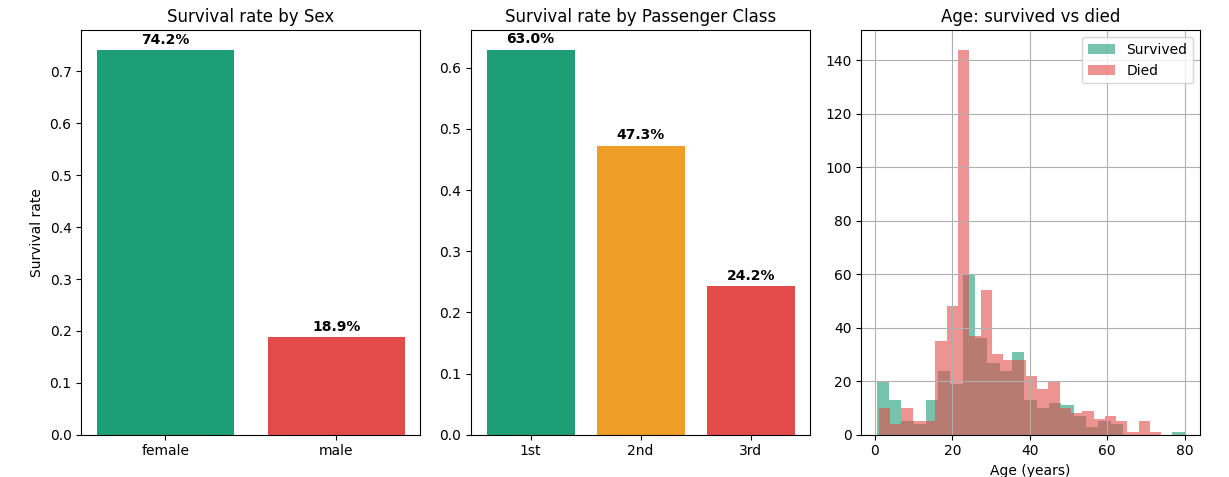
Key insight: Being female gave you a 74% chance of surviving. Being male: only 19%. Being in 1st class gave you 63% survival vs 24% in 3rd class. Sex and Pclass will be the two most important features in any Titanic model.
Step 2: Violin plots — see the full distribution, not just the average
Bar charts show averages. But Violin plots show the full shape of the distribution per group.
fig, axes = plt.subplots(1, 2, figsize=(10, 4))

# Fare distribution by survival
sns.violinplot(
    data=df,
    x='Survived',
    y='Fare',
    hue='Survived',
    ax=axes[0],
    palette=['#E24B4A', '#1D9E75'],
    legend=False
)
axes[0].set_title('Fare distribution: survived vs died')
axes[0].set_xticks([0, 1])
axes[0].set_xticklabels(['Died', 'Survived'])

# Age distribution by survival
sns.violinplot(
    data=df,
    x='Survived',
    y='Age',
    hue='Survived',
    ax=axes[1],
    palette=['#E24B4A', '#1D9E75'],
    legend=False
)
axes[1].set_title('Age distribution: survived vs died')
axes[1].set_xticks([0, 1])
axes[1].set_xticklabels(['Died', 'Survived'])

plt.tight_layout()
plt.show()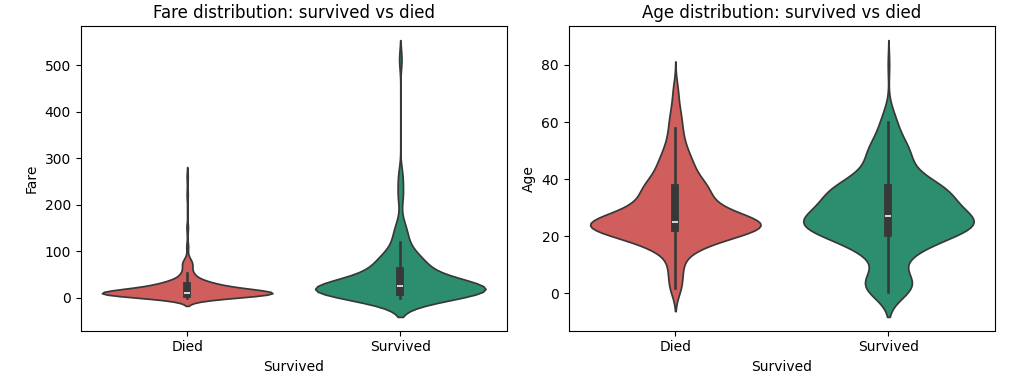
What the Fare violin tells us ?
Survivors paid significantly higher fares on average. The violin for “Survived” is thicker at higher fare values — passengers who paid more had access to better cabin locations, closer to lifeboats. This is Fare acting as a proxy for wealth and location on the ship.
What the Age violin tells us ?
The shapes look quite similar! Both groups have a similar age distribution. This is why Age showed only -0.07 correlation with Survived earlier. But look carefully — the survived group has a slightly fatter section in the 0-10 range. Kids did get priority. You can literally see the women and children first effect right in the data.
Step 3: The correlation heatmap — who are the strongest predictors?
# Encode Sex as numeric for correlation analysis
df['Sex_encoded'] = (df['Sex'] == 'female').astype(int)

corr_cols = ['Survived', 'Pclass', 'Sex_encoded', 'Age',
             'SibSp', 'Parch', 'Fare', 'Has_Cabin']
corr_matrix = df[corr_cols].corr()

plt.figure(figsize=(9, 7))
mask = np.zeros_like(corr_matrix, dtype=bool)
mask[np.triu_indices_from(mask)] = True

sns.heatmap(corr_matrix,
            annot=True,
            fmt='.2f',
            cmap='RdYlGn',
            center=0,
            square=True,
            linewidths=0.5,
            mask=mask)
plt.title('Feature correlation matrix — Titanic')
plt.tight_layout()
plt.show()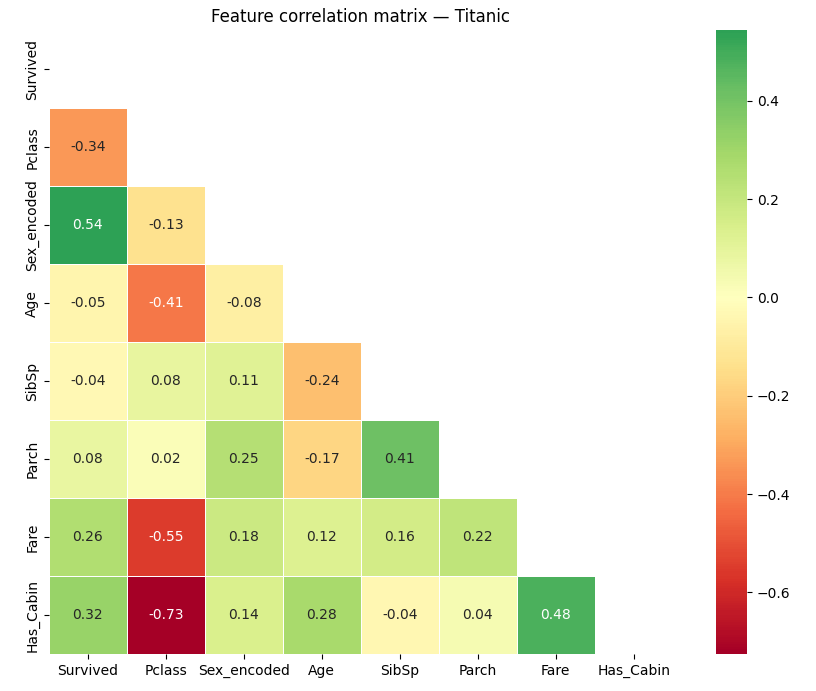
Check out these results (correlation with Survived):
| Feature | Correlation | What it means |
|---|---|---|
| Sex_encoded | +0.54 | Strong predictor—females lived |
| Has_Cabin | +0.32 | Having a cabin (= 1st/2nd class) predicts survival |
| Fare | +0.26 | More money, better outcome |
| Pclass | -0.34 | Higher class number (lower class) predicts death |
| Age | -0.05 | Almost no linear relationship with survival |
| SibSp | -0.04 | Negligible |
Remember, this is Pearson correlation. If something is nonlinear—like kids having extra odds—it won’t show up here. That is why you always want to pair this kind of analysis with a closer group look with heatmap.
Step 4: The crosstab—the two-line powerhouse
Want the biggest insight with almost no code? Try a crosstab:
# Survival rate by Sex AND Pclass combined
pivot = pd.crosstab(
    index=df['Pclass'],
    columns=df['Sex'],
    values=df['Survived'],
    aggfunc='mean'
).round(2)

print(pivot)
Sex female male
Pclass
1 0.97 0.37 ← 97% of 1st class women survived!
2 0.92 0.16
3 0.50 0.14 ← only 14% of 3rd class men survivedThis tiny table tells a huge story:
- First-class woman** had a 97% survival rate — almost guaranteed rescue
- Third-class man** had a 14% survival rate — almost guaranteed death.
- Even for men, being in first class (37%) more than doubled your odds vs third class (14%).
Step 5: Point biserial correlation for binary targets
For a binary target like Survived, there is a more precise way to check feature correlations:
from scipy import stats

numeric_features = ['Age', 'Fare', 'SibSp', 'Parch', 'Has_Cabin', 'Sex_encoded']

print("Point Biserial Correlation with Survived:\n")
for col in numeric_features:
    corr, pval = stats.pointbiserialr(df['Survived'], df[col])
    significance = "✓ significant" if pval < 0.05 else "✗ not significant"
    print(f"  {col:<16} r={corr:+.3f}   p={pval:.4f}   {significance}")
Result:
Point Biserial Correlation with Survived:

  Age              r=-0.047   p=0.1587   ✗ not significant
  Fare             r=+0.257   p=0.0000   ✓ significant
  SibSp            r=-0.035   p=0.2922   ✗ not significant
  Parch            r=+0.082   p=0.0148   ✓ significant
  Has_Cabin        r=+0.317   p=0.0000   ✓ significant
  Sex_encoded      r=+0.543   p=0.0000   ✓ significant
So, what did we learn?
Here is the short list, straight from EDA:
| Feature | Signal strength | Direction | Notes |
|---|---|---|---|
| Sex | Very strong | Female = survive | Most important feature |
| Pclass | Strong | 1st = survive | Proxy for wealth + cabin location |
| Fare | Moderate | Higher = survive | Correlated with Pclass — redundant but useful |
| Has_Cabin | Moderate | Has cabin = survive | We engineered this from the missing Cabin col |
| Age | Weak but real | Younger = slight advantage | Non-linear — children specifically helped |
| SibSp | Not significant | — | Drop or combine into Family_Size |
| Parch | Weak | — | Combine with SibSp |
What is next?
In Part 5, we’ll mix all this together. Multivariate analysis—combining everything we have learned and building a true predictive model. See you there.






Nice one